

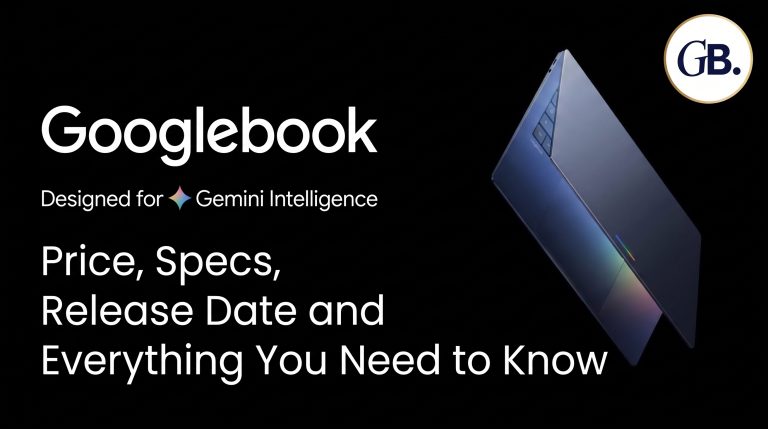
Google has officially launched Googlebook, a brand-new line of laptops built to work closely with Android phones. Pre-orders opened on September 21, 2026, and the first devices reach store shelves on October 4. Built by five hardware partners and priced from $899 to $1,299, Googlebook is Google’s most direct attempt yet to compete with the MacBook Air and premium Windows laptops.
Quick Answer
Googlebook is a range of high-end laptops launched by Google, equipped with Googlebook OS that uses Android technology and is based on ChromeOS. The minimum price begins at $899 and can go as high as $1,299, depending on the model selected. Five partners: Acer, Asus, Dell, HP, and Lenovo will begin selling their devices from October 4, 2026.
What Is a Googlebook?
A Googlebook is a laptop category, not a single device. Think of it the way “Chromebook” describes many laptops from different manufacturers running ChromeOS. Googlebook works the same way, except it runs a new operating system called Googlebook OS, and it’s positioned as a premium product rather than a budget one.
Google first teased the idea back in May 2026, describing it as a laptop meant to sit alongside an Android phone the same way a MacBook sits alongside an iPhone. The full lineup and final pricing were revealed on September 21, 2026.
Googlebook Price and Release Date
Pricing varies by manufacturer and configuration:
| Model | Starting Price |
|---|---|
| Acer Googlebook 14 | $899 (limited-time pricing) |
| Dell XPS Googlebook | $1,199 |
| Asus Googlebook 14 | $1,299 |
| HP Googlebook 14 | $1,299 |
| Lenovo Googlebook 15 | $1,299 |
Pre-orders are already open through the Google Store, Best Buy, and select retailers. Devices ship on October 4 in the United States and October 5 in Canada, the UK, Ireland, France, Germany, and Australia.
Googlebook Specs: How the Five Launch Models Compare
Each manufacturer brings its own design, but Google has set some shared minimums: every Googlebook uses premium materials (aluminum, magnesium alloy, or carbon fiber), a high-resolution touchscreen, and an NPU capable of more than 45 TOPS for on-device AI processing.
| Model | Processor | RAM | Storage | Display |
|---|---|---|---|---|
| Acer Googlebook 14 | Intel Core Ultra 5 325 / Ultra 7 355 | 16GB | 256–512GB | 14″, 2880×1800, touch |
| Dell XPS Googlebook | Snapdragon X Elite | 16–32GB | 512GB–1TB | 13″, 2560×1600, touch |
| Asus Googlebook 14 | Intel Core Ultra 5 325 / Ultra 7 355 | 16–32GB | 256–512GB | 14″, 2880×1800, OLED touch |
| HP Googlebook 14 | Snapdragon X Elite X1E-80-100 | 16–32GB | 256GB–1TB | 14″, 2880×1800, OLED touch |
| Lenovo Googlebook 15 | Intel Core Ultra 5/7 (Panther Lake) | 16GB | 256–512GB | 15.3″, 2880×1800, OLED touch |
All the products have a battery life of up to 14 hours. There is a fingerprint sensor on every device for biometric login, and some devices also come equipped with an IR camera for face unlock.
One feature is unique to all the laptops: the Glowbar. It is a light strip on the lid of the laptop that glows on booting, indicates battery status, and animates during interaction with Gemini.
What Is Googlebook OS (Aluminium OS)?
Googlebook OS, known internally during development as Aluminium OS, merges the Android app ecosystem with a desktop-style ChromeOS foundation. In practice, that means:
- Chrome browser with full extension support, since Google says roughly 70% of laptop time is spent in a browser anyway
- Android apps from the Play Store, with many optimized for keyboard, mouse, and larger screens
- A full Linux terminal, powered by a security-certified virtual machine layer, so developers can run coding tools directly on the device
- A taskbar and desktop widgets, giving it a more traditional laptop layout than a phone-style interface
Google is promising up to 10 years of OS updates, though that clock starts from when a chip or platform first launched, not from your purchase date. That means older chips like the Snapdragon X Elite (which debuted in 2024) are already a couple of years into that support window.
Gemini AI Features Built Into Every Googlebook
The AI layer is where Google is trying to differentiate Googlebook from a typical laptop:
- Magic Pointer: Wiggle the cursor to bring up Gemini and ask questions about whatever’s on screen, such as pulling dates from a PDF straight into your calendar
- Rambler: A voice-to-text tool, triggered by the repurposed Caps Lock key, that turns spoken notes into organized, formatted text
- Create My Widget: Lets you describe a widget in plain language and have Gemini build it for your desktop
- Magic Cues: Proactive suggestions, like offering to create a calendar event when the system spots a date on your screen
Connecting Your Phone: Continue On, Files, and Cast My Apps
Because Googlebook OS shares Android’s foundation, the setup process automatically pulls your phone’s saved Wi-Fi networks, passwords, and settings onto the laptop. From there, three features carry that connection even further.
- Continue On lets you pick up a task started on your phone directly on the laptop
- Files gives you direct access to your phone’s photos and files without emailing them to yourself
- Cast My Apps streams a phone app, say a food delivery app or a one-time SMS code, into a window on the laptop desktop
Software, Apps, and Gaming
Beyond Google’s own apps, every Googlebook ships with native versions of Adobe Photoshop, Adobe Lightroom, and CapCut, along with offline support for Netflix and HBO Max. For gaming, Google is bundling a free year of Nvidia GeForce NOW, and says roughly half of the top 100 Android games are already optimized for mouse, keyboard, and large-screen play.
Every purchase also includes 12 months of Google AI Pro (5TB of cloud storage plus Gemini Advanced), 3 months of YouTube Premium, and a limited trial of Photoshop.
Security
Googlebook inherits ChromeOS’s security architecture, including a Titan hardware security chip and on-device malware detection. In addition, it introduces a Level 5 security-certified hypervisor that runs an isolated Linux environment, letting developers run terminal tools without weakening the rest of the system’s protection.
Googlebook vs Chromebook vs MacBook
Googlebook doesn’t replace the Chromebook. Google has already confirmed it will keep producing Chromebooks and honor their existing 10-year update commitment. Instead, Googlebook targets buyers who’d otherwise consider a MacBook Air or a high-end Windows ultrabook. Apple offers the closest comparison here: Googlebook’s Continue On, Files, and Cast My Apps features do for Android users what Continuity and iPhone Mirroring do for Mac and iPhone owners.
Should You Buy a Googlebook?
If you already use an Android phone and want a laptop that feels genuinely connected to it, Googlebook is the first serious attempt at that experience outside Apple’s ecosystem. However, price is the catch here; you would be paying MacBook Air prices ($899–$1,299) for a computer running on a first-generation OS that has some known flaws, particularly when it comes to its ability to offer sustained software support. People who just need their computer for browsing purposes for work or studies, without needing extensive phone integration, would be better off getting a Chromebook or Windows laptop.
FAQs
What is a Googlebook?
Googlebook is a new laptop category from Google that runs Googlebook OS, combining Android’s app ecosystem with ChromeOS-style desktop features, and built to integrate closely with Android phones.
How much does a Googlebook cost?
Prices start at $899 for the Acer Googlebook 14 and go up to $1,299 for the Asus, HP, and Lenovo models, depending on configuration.
When does Googlebook release?
Pre-orders opened September 21, 2026. Devices ship October 4 in the US and October 5 in Canada, the UK, Ireland, France, Germany, and Australia.
Which processors does Googlebook use?
Models use either Intel Core Ultra 5/7 (Panther Lake) chips or Qualcomm Snapdragon X Elite processors, depending on the manufacturer.
Is Googlebook replacing the Chromebook?
No. Google has confirmed Chromebooks will continue to be sold and supported. Googlebook is a separate, higher-priced product line.
Can I run Linux tools on a Googlebook?
Yes. Googlebook OS includes a full Linux terminal environment through a security-certified hypervisor, letting developers run coding tools directly on the device.
Conclusion
Googlebook marks Google’s most serious push yet into premium laptop hardware, built specifically around the idea that your laptop and phone should work as one system. With five manufacturers on board, Gemini AI woven into daily tasks, and pricing that puts it squarely against the MacBook Air, Googlebook is a bigger bet than the Chromebook ever was. The real test now is whether Android users are willing to pay MacBook prices for a first-generation platform.
For more tech updates like this, check out our blog category.
Visit Our Recommended Websites
Here are our trusted partners and resources for your requirements: